Tampilkan postingan dengan label Utak-Atik. Tampilkan semua postingan
Rabu, 24 September 2014
Rabu, 30 Oktober 2013
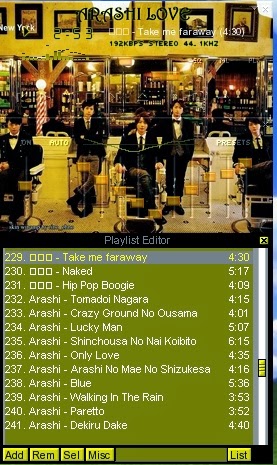
Skin Love Arashi
Loha....Minna san . apa kabarnya? moga dalam keadaan sehat ya ^^. udah lama g isi blog lagi*sibuk ama kerjaan..*yaps..sekarang coba sempatin isi lagi. yaps..ku mau share skin winamp classic Arashi di album Love...,oh,ya..kalian sudah dengar album arashi LOVE ini? wah..sugoii fresh banget lagunya. Semakin kesini lagu-lagu mereka makin dewasa dan mencoba menampilkan sesuatu yang baru. yaps disini ku share beberapa skin winamp dari gambar album Love. Baru beberapa yg mau ku share disini*nanti sisanya akan nyusul y..* yaps semoga kalian suka. jangan lupa ya..bagi yang mengambil skin ini..ditunggu koment kalian disini ya..^^. terima kasih.
Download Skin Winamp, Please this click >.<
Skin winamp Love-arashi *Click*
Skin winamp Jun-Love*Click*
Bonus Skin winamp Ohno
Skin winamp Ohno Arashi *Click*
* This skin is only for your personal use.
*If you want to share skin winamp this to your blog or website, Don't forget to include the name of the owner of the blog and link sources that make this winamp skin.
Note :
* So you can
use winamp skin, before you've setting your winamp clasicc..okay..! ^^.* This skin is only for your personal use.
*If you want to share skin winamp this to your blog or website, Don't forget to include the name of the owner of the blog and link sources that make this winamp skin.
if you take this my skin winamp, please you give comment this my blog.. thank you ^^
Label:
My Download,
Utak-Atik
Selasa, 13 Agustus 2013
Happy BirthDay Nino San ^^
Loha..loha..Happy Birthday Ninooo yang ke 30 tahun**gomen ne..telat ^^* semoga di umurmu yang sekarang semakin sukses dengan ARASHI dan pekerjaanmu and selalu awet muda serta cepat menemukan pendamping hidup ^^. Sekali lagi Tanjoubi Omedetou ^^
Saya Persembahkan di Ulang Tahun Nino san sebuah skin winamp. Semoga kalian suka ^^.
* This skin is only for your personal use.
*If you want to share skin winamp this to your blog or website, Don't forget to include the name of the owner of the blog and link sources that make this winamp skin.
if you take this my skin winamp, please you give comment this my blog.. thank you ^^
Saya Persembahkan di Ulang Tahun Nino san sebuah skin winamp. Semoga kalian suka ^^.
note:
* So you can
use winamp skin is, before you've setting your winamp clasicc..okay..! ^^.* This skin is only for your personal use.
*If you want to share skin winamp this to your blog or website, Don't forget to include the name of the owner of the blog and link sources that make this winamp skin.
if you take this my skin winamp, please you give comment this my blog.. thank you ^^
k
Bonus winamp
Label:
My Download,
Utak-Atik
Kamis, 30 Mei 2013
Skin Winamp Endless Game Arashi
Yaps..apa kabar semuanya ^^. yaps, kali ini ku mau share back lagi,skin winamp arashi,di single terbaru mereka Endless Game terlihat sekali semakin kesini mereka semakin terlihat dewasa..*keren ^^* maka itu, mau coba buat skin winamp hasil dari gambar cover single ini ^^. moga kalian suka..^^
Full this Skin winamp, Let's this click >.<
Note:
* So you can use winamp skin is, before you've setting your winamp clasicc..okay..! ^^.
* This skin is only for your personal use.
*If you want to share skin winamp this to your blog or website, Don't forget to include the name of the owner of the blog and link sources that make this winamp skin.
if you take this my skin winamp, please you give comment this my blog.. thank you ^^
Label:
My Download,
Utak-Atik
Selasa, 23 April 2013
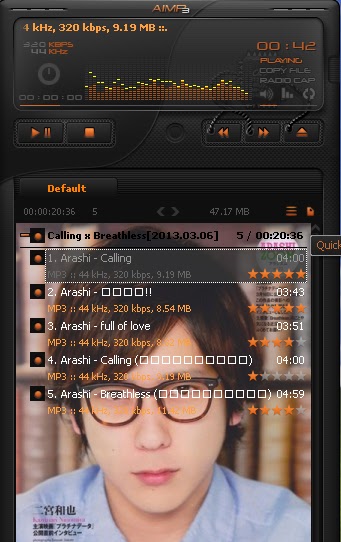
Skin Winamp Arashi Calling X Breathless
Met Pagi...semuanya. Akhirnya kelar jga buat skin winamp arashi calling. ku mencoba membuat tipe menyeluruh..ternyata g mudah..coz walaupun sudah mencoba lebih natural tapi ternyata fitur dalam sofwarenya kurang lengkap..wal hasilnya coba-coba menyelaraskan sesuai dengan latar yg dibuat..^^. yaps..sekarang ku akan share skin winamp yg ku buat...douzo ^^
Full this Skin winamp, Let's this click >.<
Note:
* So you can use winamp skin is, before you've setting your winamp clasicc..okay..! ^^.
* This skin is only for your personal use.
*If you want to share skin winamp this to your blog or website, Don't forget to include the name of the owner of the blog and link sources that make this winamp skin.
if you take this my skin winamp, please you give comment this my blog.. thank you ^^
Label:
My Download,
Utak-Atik
Rabu, 10 April 2013
Sweet Skin Winamp Arashi
Lohaa....minna ^^. genkigeyoo~ . yaps..kali ini mau share back lagi skin winamp arashi*kali ini kayanya temanya pink ky ria-tahu..pingin liat fresh2 kali ya..hehehe*yaps..ini skin winamp yg ku buat. moga kalian suka ^^.
note:
* So you can use winamp skin is, before you've setting your winamp clasicc..okay..! ^^.
* This skin is only for your personal use.
*If you want to share skin winamp this to your blog or website, Don't forget to include the name of the owner of the blog and link sources that make this winamp skin.
if you take this my skin winamp, please you give comment this my blog.. thank you ^^
BONUS ^^
note:
* So you can use winamp skin is, before you've setting your winamp clasicc..okay..! ^^.
* This skin is only for your personal use.
*If you want to share skin winamp this to your blog or website, Don't forget to include the name of the owner of the blog and link sources that make this winamp skin.
if you take this my skin winamp, please you give comment this my blog.. thank you ^^
Skin winamp Jun Pink ^^,let's this click >.<
Skin Winamp Nino Pink, Let's this click >.<
Skin Winamp Ohno Pink, Let's this click >.<
Skin Winamp Sho Pink, Let's this click >.<
Skin Winamp Aiba, Let's this click >.<
BONUS ^^
Skin Winamp ARASHI, Let's this click >.<
Label:
My Download,
Utak-Atik
Kamis, 14 Maret 2013
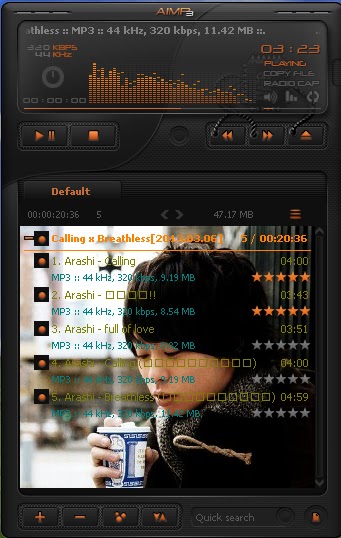
Make my skin AIMP3
Hallo~ semuanya..sudah lama tidak main kembali ke blog.*jadi kangen ^^* yaps..sekarang ku mau share kembali skin..namun kali ini, bukan skin winamp yang biasa ku buat. Lagi senang coba utak-atik skin Aimp3. ternyata ini lebih sulit dibanding waktu membuat skin winamp..namun lumayan juga hasilnya..^^. beriku ini hasilnya ^^.
note:
* So you can use AIMP3skin is, before you've setting your winamp clasicc..okay..! ^^.
* This skin is only for your personal use.
*If you want to share skin AIMP 3 this to your blog or website, Don't forget to include the name of the owner of the blog and link sources that make this winamp skin.
if you take this my skin winamp, please you give comment this my blog.. thank you ^^
berikut ini..ku share skin Aimp3. jika teman-teman bingung bagaimana
cara memasang skin ini..berikut ini ku coba memberikan
langkah-langkahnya:
1. langkah pertama....sebelumnya kamu download sofware AIMP3 nya di sofware AIMP3.
setelah di download, kamu buka sofware tersebut dan maka tampilannya AIMP3 kamu akan seperti ini..
2. langkah berikutnya..kamu klik gambar tang seperti tanda merah bulat angka 2.seperti gambar di bawah ini:
lalu kalian klik browse*seperti gambar angka 3 merah* lalu klik skin AIMP3 yg sudah kamu download. kemudian skin tersebut sudah masuk ke dalam menu skin *hasil klik downloads tersebut terlihat seperti gambar kuas dan lalu klik Apply.
dan hasil skin AIMP3 mu akan berubah ..^^.
Selain itu...Jika teman-teman ingin skin lebih berwarna..kamu tinggal atur perubahan warna yang terdapat di atas tombol lalu klik Apply .. dan Skin AIMP3mu akan berubah dengan warna pilihannmu ^^.
Selamat Mencoba ya...^^
note:
* So you can use AIMP3skin is, before you've setting your winamp clasicc..okay..! ^^.
* This skin is only for your personal use.
*If you want to share skin AIMP 3 this to your blog or website, Don't forget to include the name of the owner of the blog and link sources that make this winamp skin.
if you take this my skin winamp, please you give comment this my blog.. thank you ^^
Skin AIMP3 nino-platina data, let's this click >.<
Skin AIMP3 ninomiya, let's this click >.<
Skin winamp Ohno Maou,Let's this click >.<
Skin Aiba, Let's this click >.<
Skin Sho, lets this click >.<
Skin Ohno, let's this click >.<
1. langkah pertama....sebelumnya kamu download sofware AIMP3 nya di sofware AIMP3.
setelah di download, kamu buka sofware tersebut dan maka tampilannya AIMP3 kamu akan seperti ini..
2. langkah berikutnya..kamu klik gambar tang seperti tanda merah bulat angka 2.seperti gambar di bawah ini:
lalu tampilan kamu seperti dibawah ini:
lalu kalian klik browse*seperti gambar angka 3 merah* lalu klik skin AIMP3 yg sudah kamu download. kemudian skin tersebut sudah masuk ke dalam menu skin *hasil klik downloads tersebut terlihat seperti gambar kuas dan lalu klik Apply.
dan hasil skin AIMP3 mu akan berubah ..^^.
Selain itu...Jika teman-teman ingin skin lebih berwarna..kamu tinggal atur perubahan warna yang terdapat di atas tombol lalu klik Apply .. dan Skin AIMP3mu akan berubah dengan warna pilihannmu ^^.
Selamat Mencoba ya...^^
Label:
My Download,
Utak-Atik
Kamis, 21 Februari 2013
Skin Winamp Arashi Part 4
Utak..atik..lagi pingin buat gambar yg ini..ini hasilnya taraaaaa ......
note:
* So you can use winamp skin is, before you've setting your winamp clasicc..okay..! ^^.
* This skin is only for your personal use.
*If you want to share skin winamp this to your blog or website, Don't forget to include the name of the owner of the blog and link sources that make this winamp skin.
if you take this my skin winamp, please you give comment this my blog.. thank you ^^
- Matsumoto Jun
Let's this click >///<
- Ohno Satoshi
Let's this click >///<
Label:
My Download,
Utak-Atik
Langganan:
Postingan (Atom)